Everything Samsara does
Samsara 0.40 is here.
Imagine a mad scientist with chronic finger pain locked himself in his lab, vowing not to come out until he'd built the ultimate assistive software. Is that Samsara? Find out: download it, set up your microphone, and start talking. It's free. If it saves you time and pain, tell someone — and if it breaks, tell me.
Download for Windows Install guide Documentation
What it does
Speech becomes buffered dictation; exact commands — “scroll down”, “show numbers”, “switch window” — fire instantly without leaving the lane. “finish” pastes the whole thought. Hold-to-dictate and wake words still work too.
Extensible command system · Python plugin architecture · Local by default
Dictate, and fix it by voice
Speak in whole thoughts. Pauses do not cut you off; "finish" pastes the lot. When a word comes out wrong, the correction is also a phrase.
- "scratch that"
- "select to end"
- "retype that"
Windows and apps
Move, snap, focus and close windows, and open the app you want, without reaching for a mouse.
- "snap left"
- "move to left monitor"
- "switch to"
See it, say it, click it
Numbered overlays put a label on anything clickable. Magnifier, colour filters, cursor and text size are all one phrase away.
- "show numbers"
- "bigger text"
- "color filters"
Ava, when you want her
Frequent commands stay deterministic. Open-ended ones can go to an assistant you configure — local, or your own cloud key.
- "ava forget"
- "cloud mode"
- "brain dump"
Browsers, media and music
Tabs, the address bar and history in the browser; playback, volume and what is on screen everywhere else.
- "address bar"
- "next song"
- "open twitch"
And the rest of it
Timers, reminders, task lists, screen recording, macros, smart lights, a 3D printer, and the keys and clicks everything else is built from.
- "take a break"
- "add task"
- "record screen"
Also included
- Click a word in the draft for alternatives, spell a replacement, and save corrections in your dictionary.
- A Verbatim profile for terminals and addresses.
- A numbered window list: say a number to switch. Tasks, reminders, memos and reusable snippets alongside your dictation.
- An optional Chromium browser extension lets Show Numbers find controls on web pages.
- Named Spotify playlists (Spotify setup is required); messages to the Claude desktop app, confirmed before sending (the app needs to be installed).
- Let a configured AI app use Samsara through a local connection you enable.
- Check for updates yourself or enable daily checks. Portable updates verify the download; installed updates keep the previous install for rollback.
- Back up your configuration and restore it; find guides, support links and a feedback form in the app.
Watch a 28-second demo: dictating into Word
A screen recording: a sentence is dictated into Microsoft Word, spoken commands select and centre it, then Samsara focuses another app and dictates a request into it.
Screen recording, 28 sec, recorded with Hands Free listening on. Appearance and available commands may differ from the current release. The assistant app shown in the second half is a separate program with its own account. Download the video (MP4, 3.4 MB)
Read what happens in the video
The recording opens on an empty Microsoft Word document with the Samsara listening card at the bottom of the screen and a Hands Free badge in the corner. The spoken sentence “The garden opens on Saturday” appears in the card as a staged draft; “finish” inserts it into the document. “Select all” highlights the sentence and “align center” moves it to the middle of the page, each command confirmed by a green badge naming the command that ran. “Focus Claude” brings an assistant app to the front, the request “give me the names of three garden centers” is dictated into its box, and “submit” sends it; the app answers with “Working on it…”. The recording ends on a card with the Samsara logo, the words “Free. Open Source. Windows Beta Open!” and the address morneis.com. Commands and appearance depend on the settings in use.
How it is built
No marketing trick replaces engineering. Here's what's actually under it.
Local-first audio pipeline
WASAPI capture, faster-whisper transcription — CPU is fine. Local by design; network features are opt-in and labeled.
Streaming dictation
Live partials float in an overlay; the final paste swaps drafts through a clean undo-cycle.
Hardware integration
Direct ctypes calls into IAudioEndpointVolume for volume control (because pycaw proved unreliable). TCP M-code protocol for FlashForge printers. JSON-RPC for Hyperion LED strips. AHK for Electron apps that ignore Win32.
Plugin system
Drop a Python file in plugins/commands/, add @command — that’s a voice command. Ships with plugins for smart home, music, printers, macros, screen recording, reminders, Ava, and more.
Deterministic first. AI when needed.
Frequent commands stay deterministic — no AI, no latency, no misunderstanding. Open-ended requests can route to AI you configure: local LLMs or your own keys. You set the boundary.
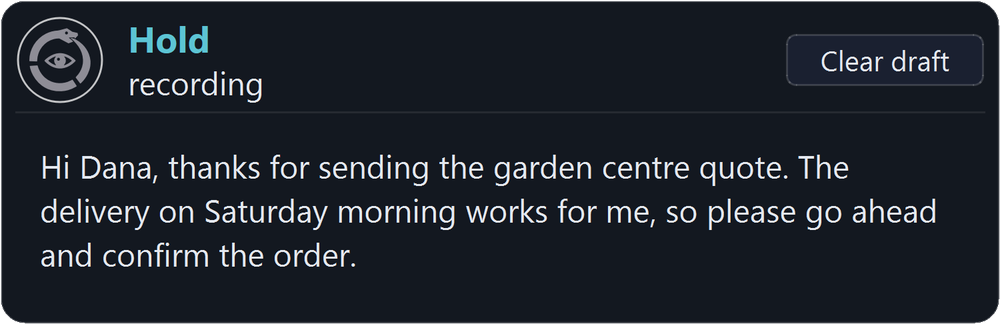 Full
 Compact
Built with, for the technically curious. You don't need to know any of this to use Samsara.
Free, local, no lock-in
Download Samsara 0.40 for Windows. Use the installer, or extract the portable ZIP and run Samsara.exe. No NVIDIA GPU is required; 0.40 runs on the CPU.
Free of cost
No purchases, subscriptions, or limits — ever.
Local-first, with disclosed network features
No account, no email, no telemetry. Core dictation never touches a server of mine.
Free of lock-in
AGPL-3.0, source public today — if I vanish, anyone can carry it on. You can’t be stranded.
Dictation, commands, wake words, history: local. Only opt-in features touch the network — model download, TTS, cloud Ava, your own webhooks.
Free forever — nothing is ever locked behind payment. Optional cloud AI just needs your own key.
♥ Sponsor development on GitHub
Licensed under AGPL-3.0 — free and open source, including for commercial use.